At last! I have just updated Google Drive on my iPad. And yes - what they say in the blog post at google is true!
Updates for iOS
Starting today, if you’re using the Drive app on your iOS device you can also edit Google documents, just as you can with the Android app. From your iPhone or iPad, you can create a new document, edit an existing one or format text. And just like on your computer, you’ll be able to see other people’s edits instantly as they’re made.
So, while I would have liked to have seen this functionality many moons ago - I am happy from what I have seen tonite that I look forward to seeing our students with iPads get shot of a couple of other applications that they have been using that they now don't need!!!
Thanks, Google. Seriously!
Wednesday, September 12, 2012


Tuesday, September 4, 2012
Motion Capture and Animation with Year 10 Students
Over recent weeks some of my students have been exploring the realms of motion capture and animation - the sort of stuff that makes some of the special effects in Avatar so cool. If you are not too sure what motion capture (or MoCap) is - then this might try and explain it a little.
The next phase will see the students apply this model and it's motion to their context - and I'll document those stages over the next couple of weeks as they get to grips with either Blender or Maya as they continue on their animation journey.
And while the clip above talks about the facial capture - we haven't worried about that aspect. We have focussed on the animation of the character. As another example of the type of animation that MoCap "captures", this is another short view
We are fortunate to have a good working relationship with the Auckland University of Technology and the department of Digital Design. John Piper, the Head of Digital Design has been a guiding hand for us in our quest to provide our students with a real life application of advanced animation techniques. AUT have the only MoCap studio outside of WETA Workshops in Wellington, and so our students have been very lucky to get access.
So - what is their project all about?
Everyone knows the wild success of Pixar and Dreamworks animated movies. From Toy Story to Cars to Madagascar to TinTin. What we are attempting is to bring the "very" short story concept to animation. Our students have no experience with animation software, but by exploring concepts in short animated stories they have worked in pairs to create a 30 - 60 second animated story.
As a lofty goal we set our sights on this type of thing ... Pixar's Knick Knack ..
After spending time understanding that there is a story board behind the movie - with everything from character development to conflict to theme - students set about creating their own story lines and characters. During the process they also had to create original art work to be the background prop for their animated story and the audio to accompany the story.
At the moment we are at the stage where the background images, audio has been created. The motion capture has been done and the students are now trying to get to grips with the animation process.
This series of short videos shows the start of the journey from motion capture to animation. We'll follow this one as it develops.
The Story Line: Stickman
Basically "Stickman" is so thin that when he goes to the closet to get a T-shirt to put on - it falls straight to the floor. He gets the idea to put on weight - and the second part sees him start pushing weights to try and bulk up. That doesn't work, so he gets a bike pump, inserts the tube into his mouth and starts inflating himself with air - to the point he explodes.
Here's the motion capture.
Now - you'll notice the "grey dots" on the suit. These are the "dots" that the cameras (on the stands in the background) are focussed on capturing the motion of. There are dots on the cap, the arms, body, hands, legs and feet. Once this motion file is captured, it then needs to be applied to a 3D model. To do this we have been using MotionBuilder. Here are a couple of versions of the process and what the final MotionBuilder output looks like.
The above file is the motion file with the "dots" - try running the 2 videos above at the same time to see how it works.
The video below is a version of the mapping of the dots captured to a standard 3D model.
Thursday, August 30, 2012
Google Docs as an online timeline creator
Just found a cool addition to the reasons why Google Apps is useful in schools - or anywhere for that matter. The timeline below is generated via a Google spreadsheet using a very simple format provided by TimeLineJS by Verité.
The spreadsheet is simply populated with URLs to any of the content you want to use - I used Flickr and YouTube for the above. You can add titles and comments in columns in the spreadsheet.
Once complete, simply publish your Google spreadsheet as a web page, copy the URL generated and paste it into the "embed generator" on the TimeLineJS page. It generates your embed code for the finished timeline which you then post on your website/blog etc. Any changes you subsequently make to your Google spreadsheet will automatically show up.
You'll find the Google Docs template half way down their page - look for this image

It's very cool and pretty darn easy to use.
There are of course plenty of other tools that do a similar job - ie they create an web based timeline.
xTimeLine is one I have used.
Another relative newcomer is MeoGraph - but I have had some trouble getting audio to work with it - not sure if it is me, the browser or our firewall getting in the way here - so more investigation required.
Others that seem to be useful (and free), but I haven't used ...
TimeToast
TimeGlider
TikiToki also looks interesting, but the free version doesn't allow you to embed by the look of it.
The spreadsheet is simply populated with URLs to any of the content you want to use - I used Flickr and YouTube for the above. You can add titles and comments in columns in the spreadsheet.
Once complete, simply publish your Google spreadsheet as a web page, copy the URL generated and paste it into the "embed generator" on the TimeLineJS page. It generates your embed code for the finished timeline which you then post on your website/blog etc. Any changes you subsequently make to your Google spreadsheet will automatically show up.
You'll find the Google Docs template half way down their page - look for this image

It's very cool and pretty darn easy to use.
There are of course plenty of other tools that do a similar job - ie they create an web based timeline.
xTimeLine is one I have used.
Another relative newcomer is MeoGraph - but I have had some trouble getting audio to work with it - not sure if it is me, the browser or our firewall getting in the way here - so more investigation required.
Others that seem to be useful (and free), but I haven't used ...
TimeToast
TimeGlider
TikiToki also looks interesting, but the free version doesn't allow you to embed by the look of it.
Wednesday, July 25, 2012
Big Brother, Freedom and Life
We all love our cell phone. If we are lucky enough to have a so called "smartphone" then chances are we tweet, we Facebook, we tumble, we browse, we email, we photograph, we video, heck - we may even make the occasional call on it. And let's be honest - we may have given the whole privacy issue about whether the information that passes through our phones might be used by someone else for whatever reason - but the chances are that we have not understood some of the issues, or thought through them, or maybe we just don't really know what is kept by phone companies and what might be done with that information.
Enter Malte Spitz. A Berlinner. And a Green Party MP in Germany. He actually went to court to find out what his phone company had on him. And with the help of some other people what he has to say in this recent TEDGlobal talk might raise a few eyebrows. It certainly provides a perspective which I found really interesting.
So - watch this 9 minute TED talk and wait till you see the graphic representation of the data that is presented towards the end. If you are an "ethics" or "social implications" enthusiast - then it will provide plenty of discussion points.
Now - you might like to know what your local phone provider has to say on this. I'm a Vodafone customer ... this is from their website this morning ..
There will of course be governmental rules around privacy of information ... here are a couple of starting points if you are interested in following through on some of this.
Telecommunications Information Privacy Code 2003
Privacy Act 1993
Enter Malte Spitz. A Berlinner. And a Green Party MP in Germany. He actually went to court to find out what his phone company had on him. And with the help of some other people what he has to say in this recent TEDGlobal talk might raise a few eyebrows. It certainly provides a perspective which I found really interesting.
So - watch this 9 minute TED talk and wait till you see the graphic representation of the data that is presented towards the end. If you are an "ethics" or "social implications" enthusiast - then it will provide plenty of discussion points.
Now - you might like to know what your local phone provider has to say on this. I'm a Vodafone customer ... this is from their website this morning ..
1. What information does Vodafone collect?
We collect information relating to you that you have provided to us (for example, on an application or registration form or through the way you use our products and services) or that we may have obtained from another source (such as our suppliers or from marketing organisations and credit agencies).
This information may include, your name, address, telephone numbers, information on how you use our products and services (such as the type, date, time, location and duration of calls or messages, the numbers you call and how much you spend, and information on your browsing activity when visiting one of our group companies' websites), the location of your mobile phone from time to time, lifestyle information and any other information collected in relation to your use of our products and services.
There will of course be governmental rules around privacy of information ... here are a couple of starting points if you are interested in following through on some of this.
Telecommunications Information Privacy Code 2003
Privacy Act 1993
Friday, July 20, 2012
Google bits and pieces
Just thought it might be useful to share some stuff that you may not have found on Google yet.
1. Learn some search tips and tricks via "A Google a Day"

According to Google - "Trivia with a twist. Search for answers, then challenge friends and climb the Google+ leaderboard. A Google A Day is the trivia game where searching for the answer on Google is not only allowed but encouraged".
While it works well with Google+, if you haven't enabled Google+ n your Google Apps for Education account just follow the link at the top to go to the "regular version"
So far today I've learned about electric- blue clouds in the mesosphere and cartomancy. Might be a fun activity for a class or tutor time.
2. While on Google - check out their "Inside Search" pages for ways to improve your results with Google search options

3. And while still around Google - check out their educators pages - lots of new and newly organized stuff here.

They have a new "curriculum" for helping better understand the use of YouTube.
YouTube is probably the first or second place I go to search for information. Why?
I'm a visual learner - and often I am looking for "how to do" something ... and for me, a video on how to do something is better for me than wading through pages of "standard hits" on a regular search.
There may be just as much value in this for teachers as students if you are unsure of many of the issues and how they play out in today's rapidly changing world. Youtube accounts for the majority of web traffic that we consume at school. This video explains it a little, and this link takes you to the YouTube curriculum.
4. Sticking with "literacy" issues - check out the Digital Literacy tour. Staying safe and playing safe are covered well here with teacher guides and student notes.

I'm a fan of Google Apps - mainly because they are easy to use, easy to share and easy to maintain. More recently Google have restored offline access and editing (anyone remember Google Gears?) and while the editing tools on iPhone and iPad are pretty rudimentary at this stage - you can at least do some editing and that is good.
On the training page for Google Apps for Ed you'll find a wealth of resources.
But of course - you'll find that YouTube has a whole series of videos on how to do stuff in Google Apps - here's just 1 example
Tuesday, June 19, 2012
Further thoughts from Northern Beaches
So, there are a couple of other notes I have from the visit to Northern Beaches ...
Over lunch I talked at some length with their Director of their online school. Yes - they have an online school currently delivering online HSC courses to in excess of 200 students. Some of their own students are enrolled in these courses, with the other students coming from around NSW and out of state too. Courses at Y11 and 12 range from Ancient History through Business Studies through Physics, Chemistry and a pile of others. All are charged at a flat rate (nominally $1050). All are delivered via Moodle and their site is managed and hosted by Catalyst (Australia).
So - students physically "in zone" and enrolled at the school are able to opt into the online course. This means they don't need to attend school. Some don't. Some do.
According to their Director, the top grades in subjects in HSC tend to be achieved by the students enrolled online. In addition, students enrolled online achieve the greatest proportion of their top grades too.
Now there is an interesting aside to this: ...
... I've just read a research report comparing two modes of preparation for online learning (JDTLE, Vol 28, No. 4, Summer 2012 p146) that in effect says that teachers who have done a university paper on delivering online learning are no more effective than teachers who have done a one day course on delivering online learning. [That's no surprise to me.]
So, clearly there are no barriers to take up by teachers to teaching online if they want to. So where does this lead us then? ...
I've written about the long tail of education before. To me it is clear that at least Y 11 - 13 students will have the opportunity to study online in this part of the world sometime soon. Most secondary schools have some form of LMS and some degree of buy in from staff/students/parents. Just seems a natural progression. Maybe we should be leading this ... before somebody else does and we have to play catch up.
Over lunch I talked at some length with their Director of their online school. Yes - they have an online school currently delivering online HSC courses to in excess of 200 students. Some of their own students are enrolled in these courses, with the other students coming from around NSW and out of state too. Courses at Y11 and 12 range from Ancient History through Business Studies through Physics, Chemistry and a pile of others. All are charged at a flat rate (nominally $1050). All are delivered via Moodle and their site is managed and hosted by Catalyst (Australia).
So - students physically "in zone" and enrolled at the school are able to opt into the online course. This means they don't need to attend school. Some don't. Some do.
According to their Director, the top grades in subjects in HSC tend to be achieved by the students enrolled online. In addition, students enrolled online achieve the greatest proportion of their top grades too.
Now there is an interesting aside to this: ...
... I've just read a research report comparing two modes of preparation for online learning (JDTLE, Vol 28, No. 4, Summer 2012 p146) that in effect says that teachers who have done a university paper on delivering online learning are no more effective than teachers who have done a one day course on delivering online learning. [That's no surprise to me.]
So, clearly there are no barriers to take up by teachers to teaching online if they want to. So where does this lead us then? ...
I've written about the long tail of education before. To me it is clear that at least Y 11 - 13 students will have the opportunity to study online in this part of the world sometime soon. Most secondary schools have some form of LMS and some degree of buy in from staff/students/parents. Just seems a natural progression. Maybe we should be leading this ... before somebody else does and we have to play catch up.
The Writing is on the Wall ... and the Window ...
So - just recapping on the last reflection I have of Northern Beaches ... They are not a new school. They are not purpose built.
They have done some stuff which is cool with their learning spaces.
Apart from knock down walls in older classroom blocks, they have also painted every surface with a surface coating (aka paint) that lets them write on any of the surfaces. Here's a couple of shots of an "older" classroom with a TV on the wall and notes next to it.


And then of course, the natural extension is that they can write on any surface at all - here's an example of some brainstorming from their last prof learning session that was still on the windows ...
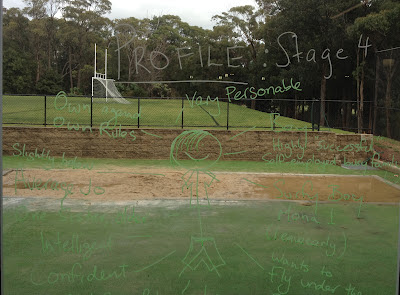
They are a school doing incremental things ... the "bunny hops" that they referred to - and I mentioned in a previous post. So - as well as using technology to develop the learning spaces they are adapting the physical spaces to try and enhance student learning.
Other examples I saw of this were a "home built" whiteboard as a tabletop - they were losing a whiteboard to make way for a folding door - so the students decided that they could build it into another work space and try it out as a desk. The result - the students (and teachers) loved using it as a brainstorming space.
So the takeouts remain ... they are not afraid to try things. Even small things. And there is a fundamental understanding with all staff and students.
They are all aware of, and can articulate, what their learning mission is.
They have done some stuff which is cool with their learning spaces.
Apart from knock down walls in older classroom blocks, they have also painted every surface with a surface coating (aka paint) that lets them write on any of the surfaces. Here's a couple of shots of an "older" classroom with a TV on the wall and notes next to it.


And then of course, the natural extension is that they can write on any surface at all - here's an example of some brainstorming from their last prof learning session that was still on the windows ...

They are a school doing incremental things ... the "bunny hops" that they referred to - and I mentioned in a previous post. So - as well as using technology to develop the learning spaces they are adapting the physical spaces to try and enhance student learning.
Other examples I saw of this were a "home built" whiteboard as a tabletop - they were losing a whiteboard to make way for a folding door - so the students decided that they could build it into another work space and try it out as a desk. The result - the students (and teachers) loved using it as a brainstorming space.
So the takeouts remain ... they are not afraid to try things. Even small things. And there is a fundamental understanding with all staff and students.
They are all aware of, and can articulate, what their learning mission is.
Subscribe to:
Posts (Atom)